
Best Mileage Tracker App in Canada: CRA Log & Reimbursement

Updated: Oct 1
If you drive your own car for work in Canada, every business kilometre is money you're owed. The problem is proving it. A CRA mileage app logs each work drive for you in the background, keeps the mileage log the CRA expects, and turns it into a report you can send your manager at month-end. No paper logbook, no spreadsheet, no guessing kilometres from memory on the last day of the month.
Drive your own car for work? Fuelshine logs every work drive automatically and turns it into a reimbursement report you can send your manager, plus an audit-ready CRA mileage log for tax time. Free to start: Get it on Google Play · Download on the App Store
This guide covers what a CRA mileage app does, the 2026 CRA rates and what your kilometres are worth, what your log needs to include, and how to get reimbursed in a few taps.
Who this guide is for
You probably fit one of these:
You're an employee who uses your own car for work. Sales reps, field technicians, home care and healthcare staff, real estate agents, inspectors, and anyone who drives between clients or job sites. Your company pays you back per kilometre, and you have to submit a mileage claim.
You're self-employed or a contractor. You claim vehicle expenses on your own tax return and need a log that holds up if the CRA asks.
You do both. A day job with a mileage claim, plus side work you deduct at tax time.
If you've ever rebuilt a month of driving from your calendar the night before a claim is due, this is for you.
What a CRA mileage app does for you
A good CRA mileage app takes the busywork out of getting paid back for driving. Here's what it should handle without you thinking about it:
Logs every drive automatically. It notices when you start driving and records the date, start and end points, distance and time. You don't press start or stop.
Lets you tag trips Business or Personal. One tap per trip, or tag a batch at once at the end of the week.
Does the math. It multiplies your business kilometres by the CRA rate, or your company's own rate, and shows you the dollar amount.
Builds your report. Export your business trips as a reimbursement report for your manager or payroll, or as a mileage log for your accountant.
Keeps a record you can stand behind. Each entry carries the details the CRA asks for, recorded at the time you drove, not pieced together later.
That last point matters more than most people think. A log written from memory in April is easy to question. A log recorded trip by trip, as it happened, is much harder to argue with.
2026 CRA mileage rates: what your kilometres are worth
For 2026, the CRA's reasonable per-kilometre allowance rates are:
73¢ per km for the first 5,000 km driven for work in the year
67¢ per km for every km after that
Add 4¢ per km in the Northwest Territories, Yukon and Nunavut (77¢ and 71¢)
Many employers pay these rates. Some use their own rate, and that's fine: your claim is based on whatever your company's policy says. Fuelshine lets you use either the CRA rate or a custom company rate.
Here's what business driving adds up to at the 2026 CRA rates, with the math shown:
5,000 km a year: 5,000 × $0.73 = $3,650
10,000 km a year: $3,650 + (5,000 × $0.67) = $7,000
15,000 km a year: $3,650 + (10,000 × $0.67) = $10,350
20,000 km a year: $3,650 + (15,000 × $0.67) = $13,700
Now think about the trips that slip through the cracks. A quick run to a supplier, a detour to a second client, the drive back to the office. Miss just 50 business km a week and that's about 2,500 km a year. At 67¢ a km, you've left roughly $1,675 on the table, every year, for trips you actually drove.
This is the real reason to use an app. It's not about tracking for its own sake. It's about not doing unpaid driving.
Reimbursement, allowance or deduction: which one applies to you?
Employers pay for work driving in different ways, and it changes what you need from your log:
Per-km reimbursement or allowance. Your company pays you a set amount for each business kilometre, usually at or near the CRA rate. When the allowance is reasonable and based only on the kilometres you drive, it's generally not counted as taxable income for you. Your job is simply to submit accurate kilometres, and that's exactly what the report is for.
Flat monthly car allowance. Some companies pay a fixed amount no matter how much you drive. A flat allowance is usually taxable, and you may be able to claim your own vehicle expenses instead if your employer signs the CRA's form T2200. Either way, a full-year log is what supports the claim.
No payment at all. If you're required to use your car for work and your employer doesn't pay you back, the same T2200 route may apply.
Not sure which one you're on? Check your company's expense policy or ask payroll. Whichever it is, a trip-by-trip log is the record everything else is built on.
What your CRA mileage log needs to include
Whether you're claiming from your employer or deducting on your own return, the CRA expects a log that shows, for each business trip:
The date
Where you went (the destination)
Why you went (the business purpose, such as "client visit" or "site inspection")
How many kilometres you drove
The CRA also expects you to record your odometer reading at the start and end of the year, so your business kilometres can be compared with your total driving.
Two things make a log hard to question: it was kept as you went, and it's consistent. Fuelshine records each drive at the time it happens, so the date, route and distance are captured on the spot. You add the purpose with a tap. If you connect a supported vehicle (optional), Fuelshine can also check your logged distance against the vehicle's own odometer data.
How to get reimbursed with a CRA mileage app, step by step
Here's the whole routine. After the first day, it takes a few seconds a week.
Step 1: Install Fuelshine
Download it from Google Play or the App Store and create your free account.
Step 2: Set up your rate and vehicle
Pick the CRA rate, or enter the rate your company pays. Add your vehicle and allow location access so trips are detected automatically.

Step 3: Drive as usual
Each drive is recorded in the background with date, route, distance and time. You don't press start or stop.

Step 4: Tag your trips
Mark each trip Business or Personal, and add a purpose if your company asks for one. Forgot for a few days? Tag them in a batch later. The trips are already recorded.

Step 5: Send your report
At month-end, export your business trips as a reimbursement report and send it to your manager or payroll. At tax time, export your full mileage log for your accountant.
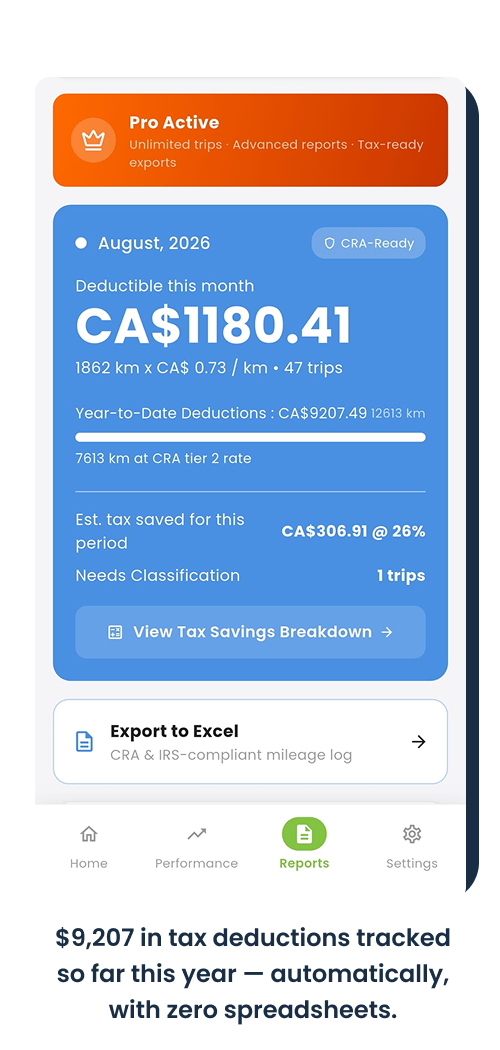
That's it. No logbook in the glovebox, no end-of-month spreadsheet, no emailing yourself notes after every client visit.
Will your employer see your personal trips?
This is the first thing most people ask, and it's a fair question.
You tag each trip Business or Personal before you export, and you choose what goes into the report you send. Fuelshine is your own app on your own phone. It isn't a company tracking tool that your manager logs into to watch where you drive.
If your company later decides to use Fuelshine for the whole team, that's a separate setup your company controls, and it's built around business trips and claims, not your weekends.
Best mileage tracker app in Canada: what to look for
There are plenty of mileage apps. Most were built for US drivers and US rules, then adapted. If you're in Canada, check for these before you pick one:
Kilometres and CRA rates built in, not miles with a converter bolted on
Automatic trip detection, so you're not relying on memory
Business and Personal tagging that takes one tap
A reimbursement report you can send your employer, not just a tax log
A custom rate option for companies that don't use the CRA rate
Audit-ready detail on every trip: date, destination, purpose and distance
No hardware to plug into your car
Free to start, so you can see your own numbers before you pay anything
Fuelshine checks every box on that list. It also adds a few things other mileage apps don't:
Verified odometer (optional). Connect a supported vehicle and Fuelshine checks logged distance against the car's own odometer data. Handy if your claims are ever questioned.
Driving coach. After each trip, see harsh braking, hard acceleration, speeding and idling, so you can drive smoother and spend less on fuel.
EcoPoints. Earn points for efficient driving and consistent trip logging.

Self-employed or a contractor?
The same log works for you. Instead of sending a reimbursement report to a manager, you'll use your business kilometres to work out the vehicle expenses you claim on your return. Keep your full-year log, your start and end-of-year odometer readings, and your receipts for fuel, insurance and maintenance.
If you're both an employee and self-employed, you can tag trips by type and export them separately at the end of the year.
Get your coworkers reimbursed too
If you drive for work, chances are your coworkers do too, and they're probably losing kilometres the same way you were. Share Fuelshine with them. Something as simple as this works:
"I've been using Fuelshine to log my work drives. It records them automatically, and my monthly mileage claim takes two minutes now."
If your company wants everyone's mileage claims in one place, it can set up Fuelshine for Teams. Your manager gets cleaner claims, and you keep using the same app you already know.
Manage a team that drives for work?
Run the free 60-second employer-liability audit to see what unverified mileage and uninsured drivers could cost your company, then see how Fuelshine handles reimbursement for the whole team.
For HR, office and fleet managers · No sign-up · No hardware
Frequently asked questions
Is Fuelshine a CRA mileage app?
Yes. Fuelshine logs your drives in kilometres, has the 2026 CRA rates built in, and records the details the CRA asks for on each business trip: date, destination, purpose and distance. It also supports IRS rates in miles if you drive in the United States.
Can I use Fuelshine for employer mileage reimbursement?
Yes. Export a report of your business trips with dates, distances and the amount at your chosen rate, then send it to whoever approves your mileage claims.
What if my company doesn't use the CRA rate?
Enter your company's rate instead. Fuelshine calculates your amount at whatever rate you choose.
What if I forget to tag a trip?
Nothing is lost. Every drive is recorded automatically whether you tag it or not. Review and tag trips in a batch before you send your report.
Will it drain my battery?
Fuelshine uses your phone's location to detect and record drives, much like a navigation app. Your phone's battery settings show exactly how much it uses, so you can check for yourself after a few days of driving.
Do I need to plug anything into my car?
No. Fuelshine runs on your phone. Connecting a supported vehicle for verified odometer readings is optional.
Is it free?
Free to start. Fuelshine Pro unlocks unlimited trips, multiple vehicles and advanced reports.
Start logging your work kilometres today
Every business kilometre you don't log is money you don't get back. Install Fuelshine, drive as usual, and send your first reimbursement report at the end of the month.
Driving in the US? See our guide to the best IRS mileage app for 2026. Want the full breakdown of this year's rates? Read the CRA mileage rate 2026 guide.
Related guides
Fuelshine helps you keep accurate records. It is not tax advice. Check with your accountant, employer or the CRA for your situation.


Comments